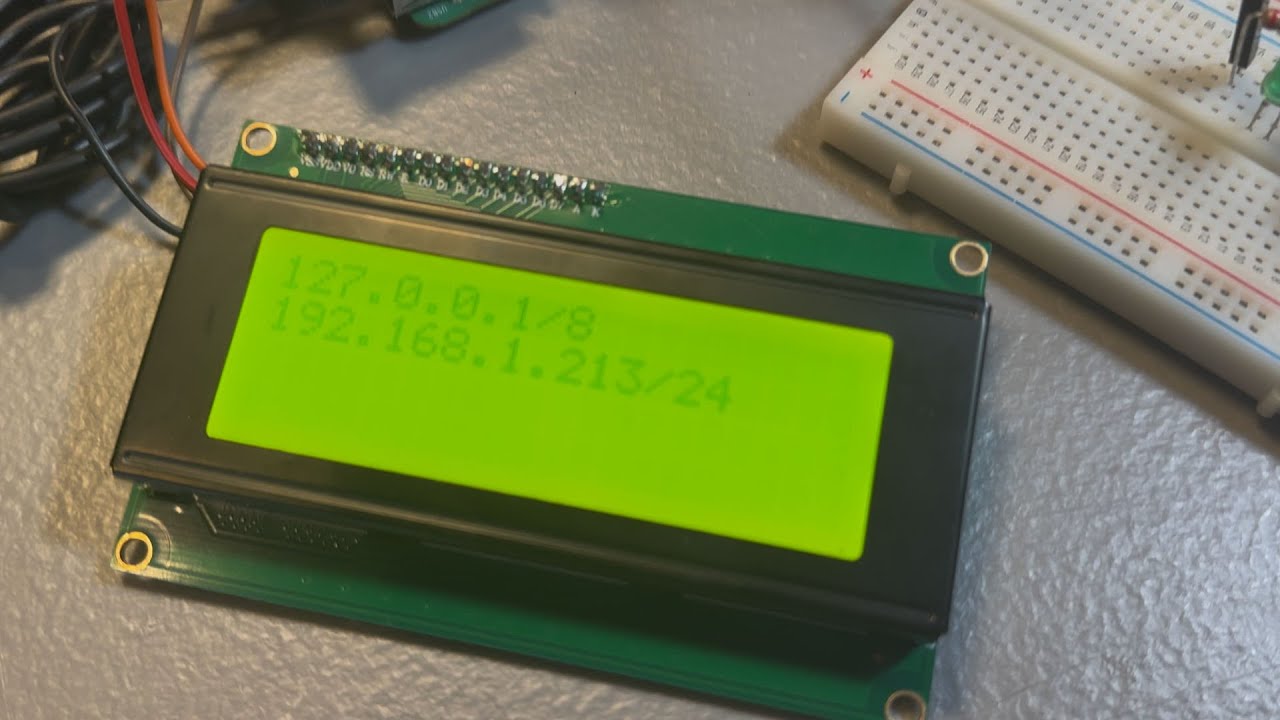
Eli the Computer Guy demonstrates how a simple 20x4 I2C LCD screen can be used with a Raspberry Pi to display essential information like IP addresses for AI and IoT projects, eliminating the need for expensive monitors. He emphasizes the practicality and cost-effectiveness of using basic displays for headless devices and previews an upcoming class on integrating such components into edge AI applications.
In this episode of “Stupid Geek Tricks,” Eli the Computer Guy discusses the practical use of a simple LCD screen for Raspberry Pi projects, especially those involving AI and IoT devices. He contrasts the current obsession with high-end displays—such as 8K, 240Hz screens—with the reality that many projects only require basic information output, like an IP address. For headless devices that don’t need a full monitor, a small, inexpensive LCD can be the perfect solution.
Eli demonstrates the use of a 20x4 I2C LCD screen, which communicates with the Raspberry Pi using the I2C electronics protocol. He explains that this type of screen is ideal for displaying essential information, such as the device’s IP address or CPU utilization, without the need for a full-sized display. This is particularly useful for IoT devices that are often accessed remotely and may not have a dedicated monitor attached.
To illustrate, Eli runs a Python script called pylcd_ip.py, which retrieves and displays the Raspberry Pi’s IP address on the LCD screen. He shows how the script dynamically updates the display: when the wireless connection is disabled, the screen only shows the loopback address, indicating the device is offline. This real-time feedback is valuable for troubleshooting and monitoring headless devices.
Eli briefly reviews the Python code, highlighting the use of the RPLCD module for controlling the LCD. He explains how the script prints information to specific rows and columns on the screen, loops through the data, and clears the display between updates to prevent text from overlapping. He emphasizes the importance of clearing the screen regularly to maintain readability.
Finally, Eli reflects on the broader implications for project design, noting that sometimes a simple, low-cost solution like an I2C LCD screen is all that’s needed. He mentions his upcoming class at Silicon Dojo, where he’ll teach about integrating such components into Raspberry Pi projects for edge AI applications. Eli concludes by reminding viewers to choose the right tool for the job, whether it’s a Raspberry Pi with a basic LCD or a more powerful device, depending on the project’s requirements.