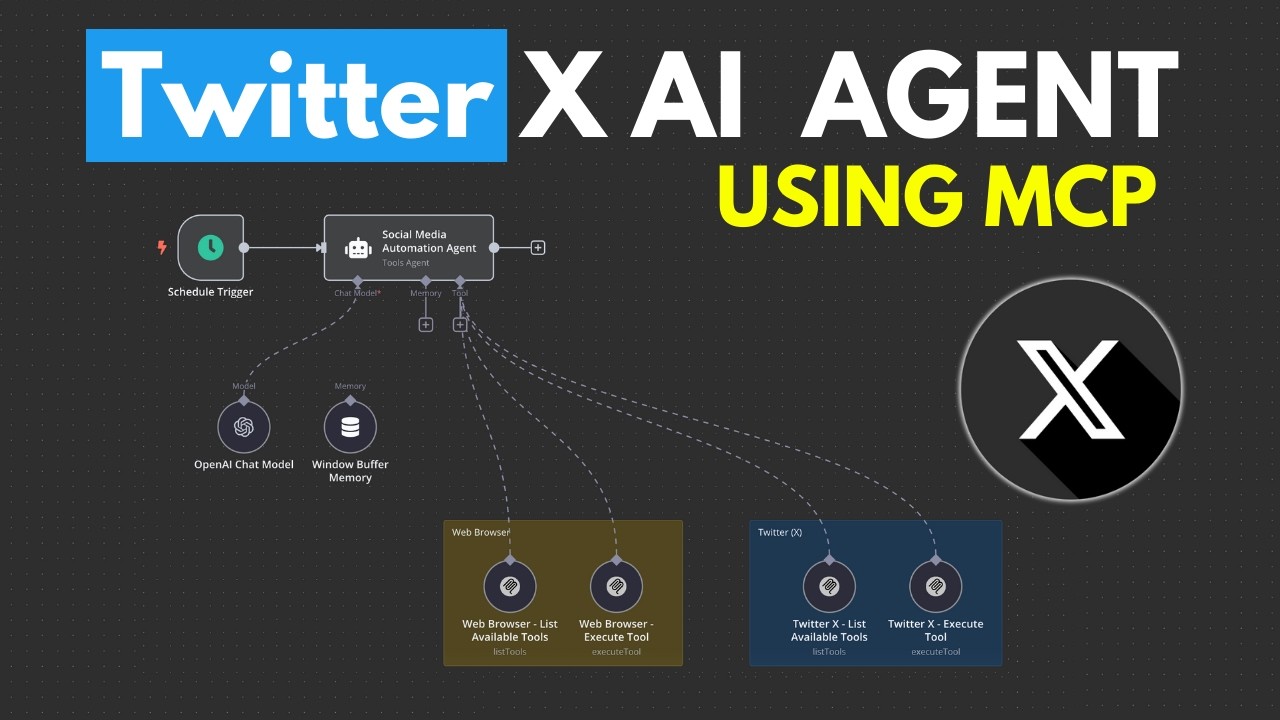
The video demonstrates how to create an AI agent using n8n and the Model Context Protocol (MCP) to automatically search for and tweet the latest AI news. The creator provides a step-by-step tutorial on setting up the agent, integrating web searches and Twitter interactions, and emphasizes the advantages of MCP for simplifying tool integration.
In the video, the creator demonstrates how to build an AI agent that automatically tweets the latest AI news using n8n and the Model Context Protocol (MCP). The agent utilizes a web browser MCP node to search for news and a Twitter MCP node to post tweets. The creator provides an example of a tweet generated based on trending news articles, setting the stage for a step-by-step tutorial on creating this automated system.
Before diving into the build process, the creator offers a brief overview of MCP, explaining its advantages over traditional API calls. MCP simplifies the integration of various tools by allowing the AI agent to dynamically pull in commands and execute them without needing to predefine each one. This flexibility streamlines the development process, making it easier to connect the AI agent to different functionalities.
The tutorial begins with setting up a basic AI chatbot agent on n8n, which can be triggered by chat messages or scheduled events. The creator emphasizes the importance of having the system running on localhost and suggests viewers familiarize themselves with MCP through previous videos or a dedicated course. After establishing the chatbot, the creator adds memory functionality to allow the agent to retain context during conversations.
Next, the video covers the integration of the MCP client for web searches and Twitter interactions. The creator guides viewers through the process of obtaining API keys for Brave Search and Twitter, explaining how to configure the necessary credentials within n8n. This section highlights the importance of proper setup to ensure the AI agent can access and utilize these external services effectively.
Finally, the creator demonstrates how to leverage the AI agent to search for the latest AI news and post insightful tweets based on that information. The video showcases the agent’s ability to execute commands, retrieve relevant tweets, and generate new content for posting. The creator encourages viewers to experiment with the setup, adjust prompts, and explore further automation possibilities, ultimately inviting them to join a community for additional support and learning resources.