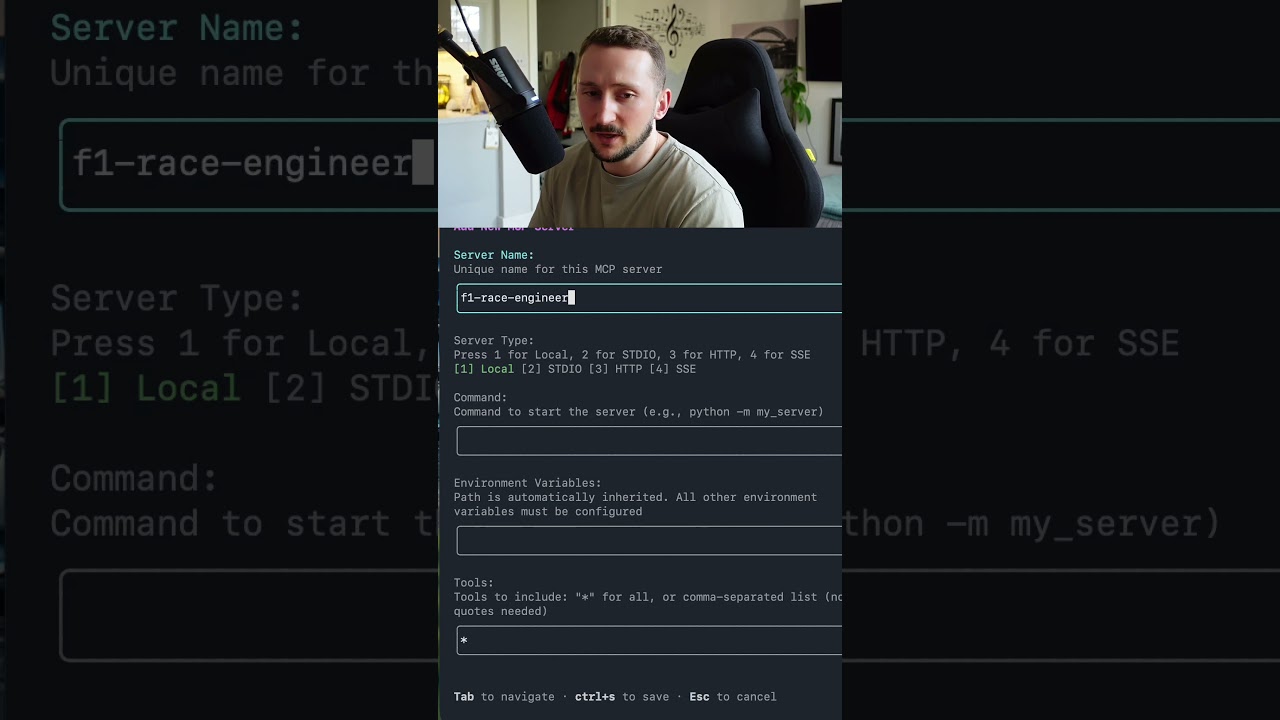
The video demonstrates how to install a custom F1-themed MCP server within the GitHub Copilot CLI, allowing users to interact with specialized knowledge directly from the terminal without needing a code editor. By adding and running the server through specific commands, users can query detailed F1 information, showcasing the expanded functionality and versatility of the Copilot CLI environment.
In this video, the creator shares how to install a custom MCP (Multi-Context Plugin) server inspired by Formula 1 into the GitHub Copilot CLI terminal. The motivation behind this project stems from the creator’s passion for F1 and the desire to build an F1-themed MCP server. The key advantage highlighted is that users can interact with the MCP server directly from the terminal without needing to be inside a code editor, making it a versatile tool for various workflows.
The process begins by opening the Copilot CLI in the terminal and accessing the interactive session. The creator demonstrates how to check existing MCP servers installed by using the slash command /MCP show, which lists servers like Atlassian MCP, Microsoft Docs, Work IQ, and the GitHub MCP server. This step helps verify the current MCP servers available before adding a new one.
To add the custom F1 Race Engineer MCP server, the creator uses the /MCP add command. This triggers input boxes where the user names the server and specifies the command to start it. The command involves running a Python virtual environment with specific arguments to launch the MCP server application. Although the command setup is somewhat complex, it is essential for correctly initializing the server within the Copilot CLI environment.
Once the server is added and started, the interface briefly flashes green to indicate success. The new F1 Race Engineer MCP server then appears alongside the other installed MCPs. The creator tests the server by querying a specific F1-related question about the difference between drivers Hamilton and Verstappen in the 2024 Monaco Grand Prix. The MCP server recognizes the query and provides a detailed comparison, showcasing its functionality directly in the terminal.
In conclusion, the video effectively demonstrates how to install and run a personalized MCP server within the GitHub Copilot CLI, expanding the tool’s capabilities beyond standard code assistance. This approach allows users to integrate custom knowledge bases or tools, like the F1 Race Engineer, into their terminal workflow, enhancing productivity and enabling specialized queries without leaving the command line. The creator ends with an encouraging note for viewers to try installing their own MCP servers and enjoy coding with this powerful setup.