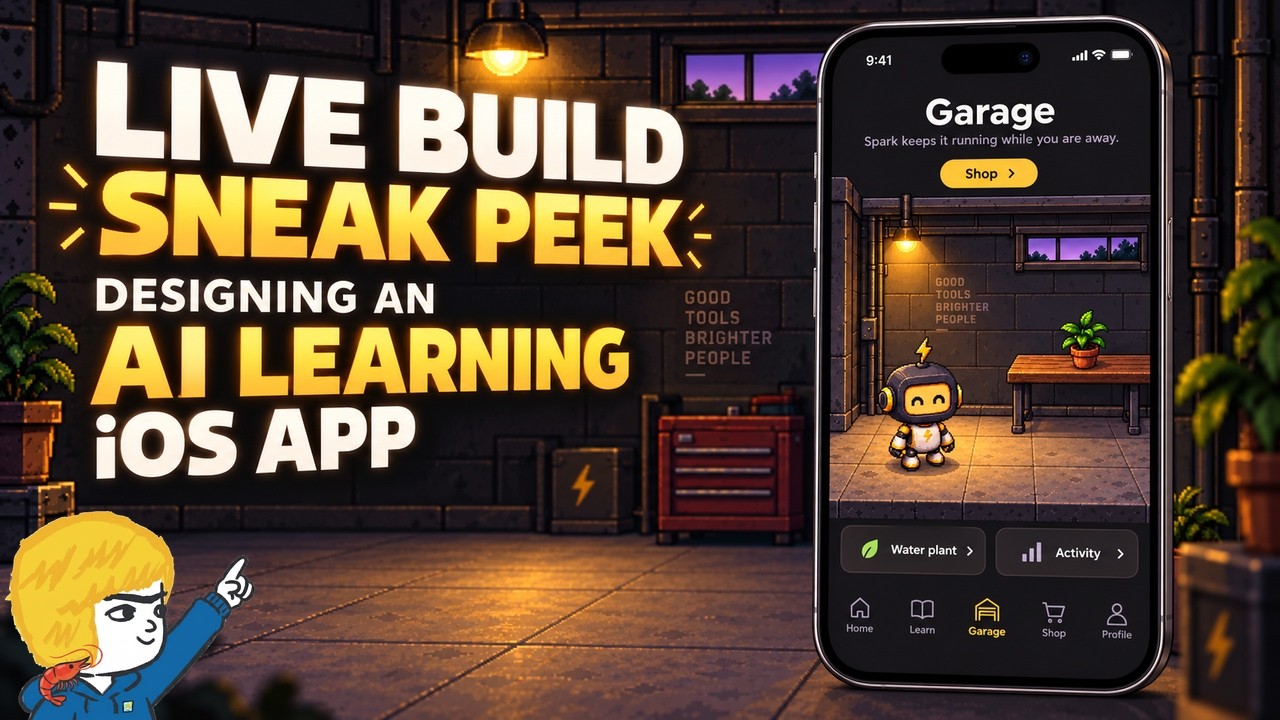
The video presents a sneak peek into the development of an iOS app designed to educate users about AI and agents in a fun and engaging way, similar to Duolingo but focused on AI learning. The creator started the project in the spring but faced challenges, especially since the initial development was done on a Windows PC with the goal of eventually making an iOS app. With recent improvements in AI models like Opus 5.5, the developer has returned to the project, aiming to build a functional app that combines quizzes and an interactive “garage” where users can manage AI agents and learn through hands-on experience.
The app’s core concept revolves around users earning credits and XP by completing quizzes that teach foundational AI concepts such as large language models, generative AI, tokens, context, memory, and agents. These credits can then be spent in the garage to upgrade and manage AI agents, schedule tasks, and build workflows between multiple agents. The garage is envisioned as a customizable space with different art styles under consideration, including chibi, pixel art, and modern 3D looks, to create an appealing mobile interface.
The curriculum is a significant focus of the project, with the developer emphasizing the difficulty AI models have in designing effective educational content due to their advanced understanding, which makes it hard for them to gauge beginner knowledge gaps. To address this, the curriculum was manually rebuilt with the help of AI tools like Claude, incorporating beginner-friendly lessons and quizzes based on the creator’s existing content and research. The quizzes are designed to test understanding with a mix of graded and review questions, ensuring users retain knowledge over time.
From a technical standpoint, the developer is using tools like Orca for project management, Cloud Code running Opus 5.5 for AI processing, and Hermes for iOS app building and image generation. The development workflow involves collaboration between these tools, with plans to separate work streams for art and coding as the project progresses. The app will be tested on an iPhone using a development build process facilitated by Expo and Apple’s developer program, allowing for live code updates over Wi-Fi from a PC.
Finally, the developer discusses plans for monetization, aiming to keep most educational content free while charging for advanced garage features and cosmetic upgrades purchasable with in-app credits. The video concludes with a demonstration of the current app interface, including the quiz section and garage with interactive elements like watering a plant. The creator invites feedback and expresses interest in making follow-up videos, highlighting this as their first iOS app project with potential for future development based on community interest.
Useful Links