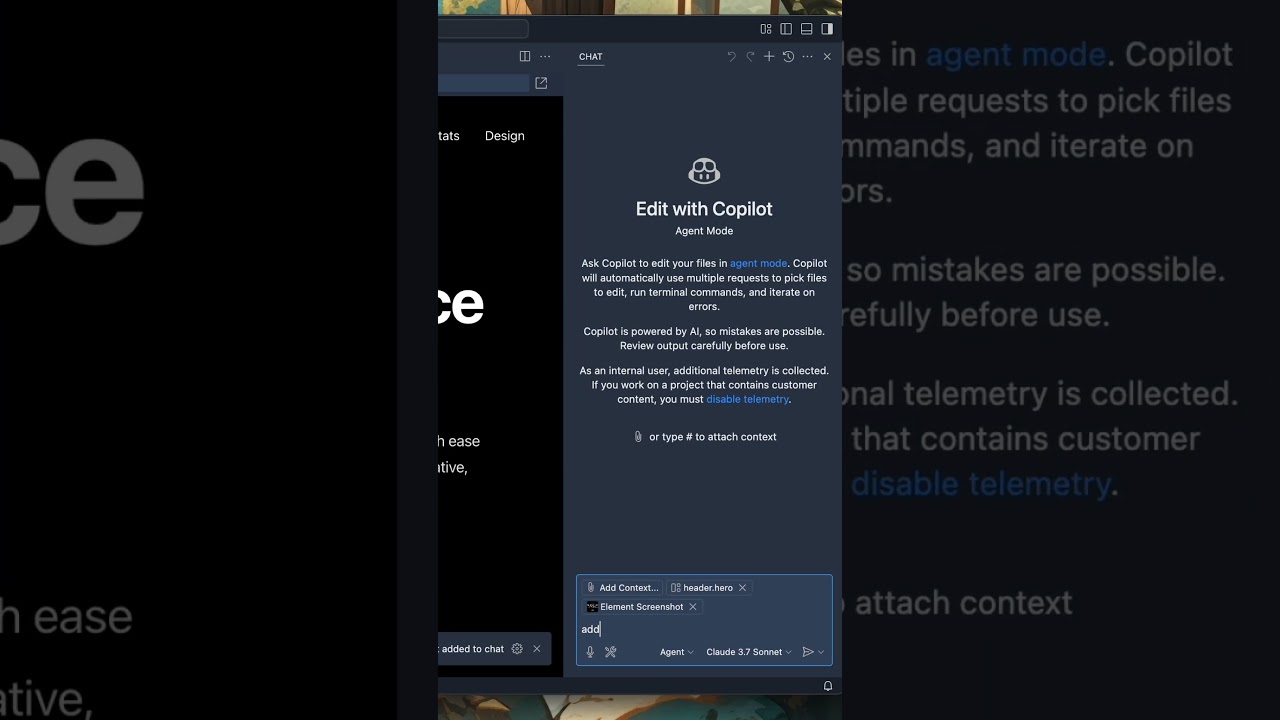
The latest VS Code update introduces a feature that allows developers to select specific UI elements within a built-in browser, automatically attaching relevant HTML, CSS, and a screenshot to the chat interface for more precise AI assistance. This enables users to easily request targeted modifications to webpage elements, streamlining the development and editing process with integrated AI support.
The latest update to Visual Studio Code introduces a new feature that enhances the way developers interact with UI elements during their coding sessions. Users can now select specific UI components within a webpage or application directly from a built-in simple browser. This functionality allows for a more integrated and efficient workflow when working on web projects, making it easier to identify and manipulate individual elements.
Once a UI element is selected, VS Code automatically attaches relevant context to the chat interface. This includes a screenshot of the chosen element, along with its corresponding HTML and CSS code. This detailed contextual information enables developers to communicate more effectively with the AI assistant, providing precise instructions or queries related to the specific component they are working on.
The process is designed to be user-friendly and seamless. After selecting an element and attaching the context, developers can type their prompts or requests directly into the chat. For example, they might ask the AI to modify the element’s style, change its background, or apply other design adjustments. The AI, powered by Copilot, then processes these instructions and suggests or implements the necessary code changes.
A practical application of this feature is demonstrated with the ability to quickly update the visual appearance of a webpage. For instance, by referencing an image file within the project, developers can instruct the AI to apply a new background to a specific element. This targeted approach streamlines the editing process, saving time and reducing the need for manual code searches and modifications.
The VS Code team is actively iterating on this feature, with plans to introduce additional enhancements in the near future. They are committed to expanding the capabilities and improving the user experience, so developers can expect more innovative tools and functionalities that further integrate AI assistance into their development workflows. Overall, this update marks a significant step toward more intelligent and interactive coding environments.