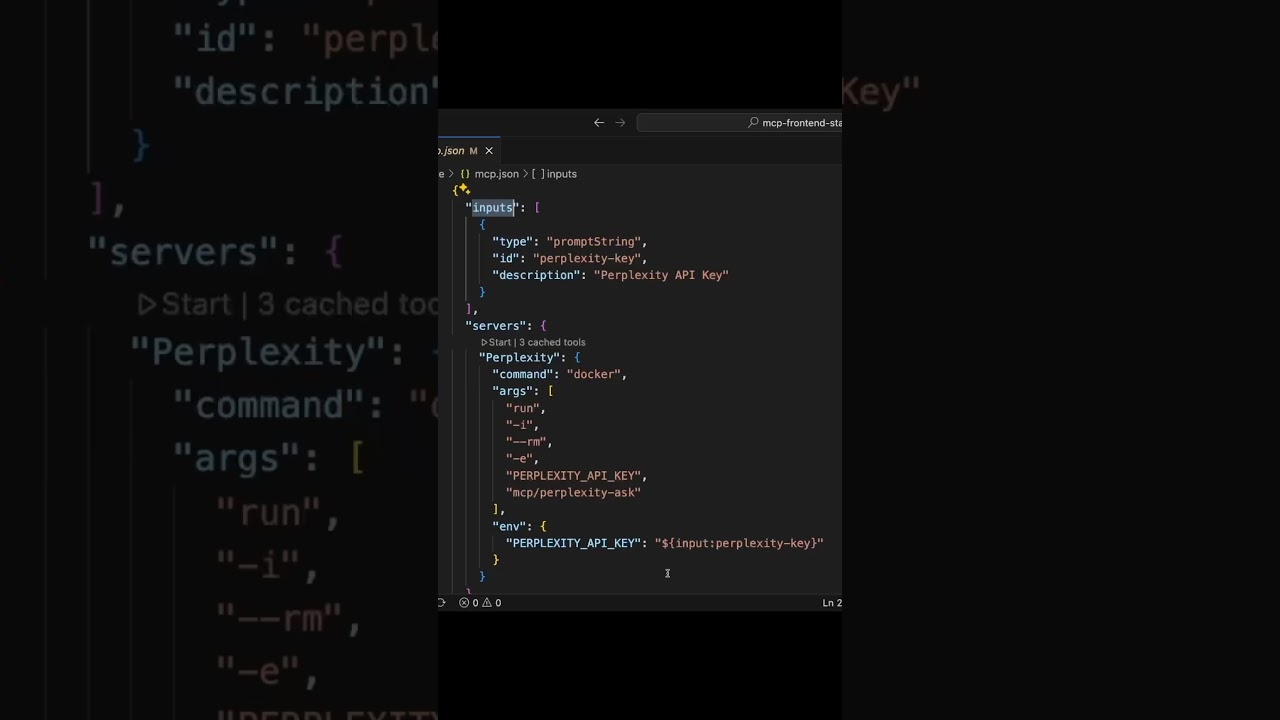
The video demonstrates how to integrate Perplexity directly into Visual Studio Code using the Model Context Protocol (MCP) in agent mode, enabling seamless access to AI tools like research and reasoning within the coding environment. This setup allows developers to securely configure, manage, and utilize Perplexity’s capabilities for tasks such as research and code enhancement without leaving VS Code.
The video explains how to integrate Perplexity directly into your coding workflow using agent mode in Visual Studio Code (VS Code) with the Perplexity MCP (Model Context Protocol) server. MCP is an open protocol that standardizes how applications provide context to AI models, which helps improve the quality of responses by supplying better context. By leveraging MCP support in VS Code, developers can connect to any MCP server and utilize the tools it offers seamlessly within their coding environment.
Configuration of the MCP server is managed through a JSON file named MCP.j, located in the VS Code folder. Users can add new servers by clicking the add server button within this JSON file, selecting the server type, and filling out the template that appears. For existing servers like Perplexity, the configuration includes general properties such as command and arguments, as well as input variables for sensitive data like API keys. These input variables allow users to securely input and store sensitive information without hardcoding it into the configuration.
When starting the Perplexity MCP server for the first time, VS Code prompts the user to input sensitive data, such as API keys, which are then stored securely. This process ensures that secrets are kept safe while allowing the server to authenticate properly. Users can manage their servers using commands like MCP list servers, which displays available servers and allows starting or stopping them as needed. This setup provides a flexible and secure way to manage multiple MCP servers within the development environment.
In agent mode, VS Code offers tools from the Perplexity MCP server, including research and reasoning tools. The video demonstrates adding a webpage about top MCP servers and using the research tool to query the best MCP servers for front-end development. The research tool is invoked automatically when prompted, and it takes a few moments to generate results. Once the response is received, Copilot uses this information to automatically edit and enhance the code, such as creating a new listing page, all within the same coding session.
Overall, the integration of Perplexity into VS Code via MCP and agent mode streamlines the process of accessing powerful AI tools without leaving the coding environment. It allows developers to perform research, generate content, and implement new features efficiently, leveraging Perplexity’s capabilities directly within their workflow. This setup emphasizes the importance of context and security, making AI-assisted development more effective and secure.